AI tooling
Mx-tooling
An AI that would rather admit "I don't know" than hand you a wrong answer.
- Role
- creator, architect and builder
- Period
- August 2026 – present
- Client
- ANWB, Mendix team
- Type
- AI tooling for development teams
- Key technology
- Claude Code, GitHub Copilot, Python, SQLite
About the project
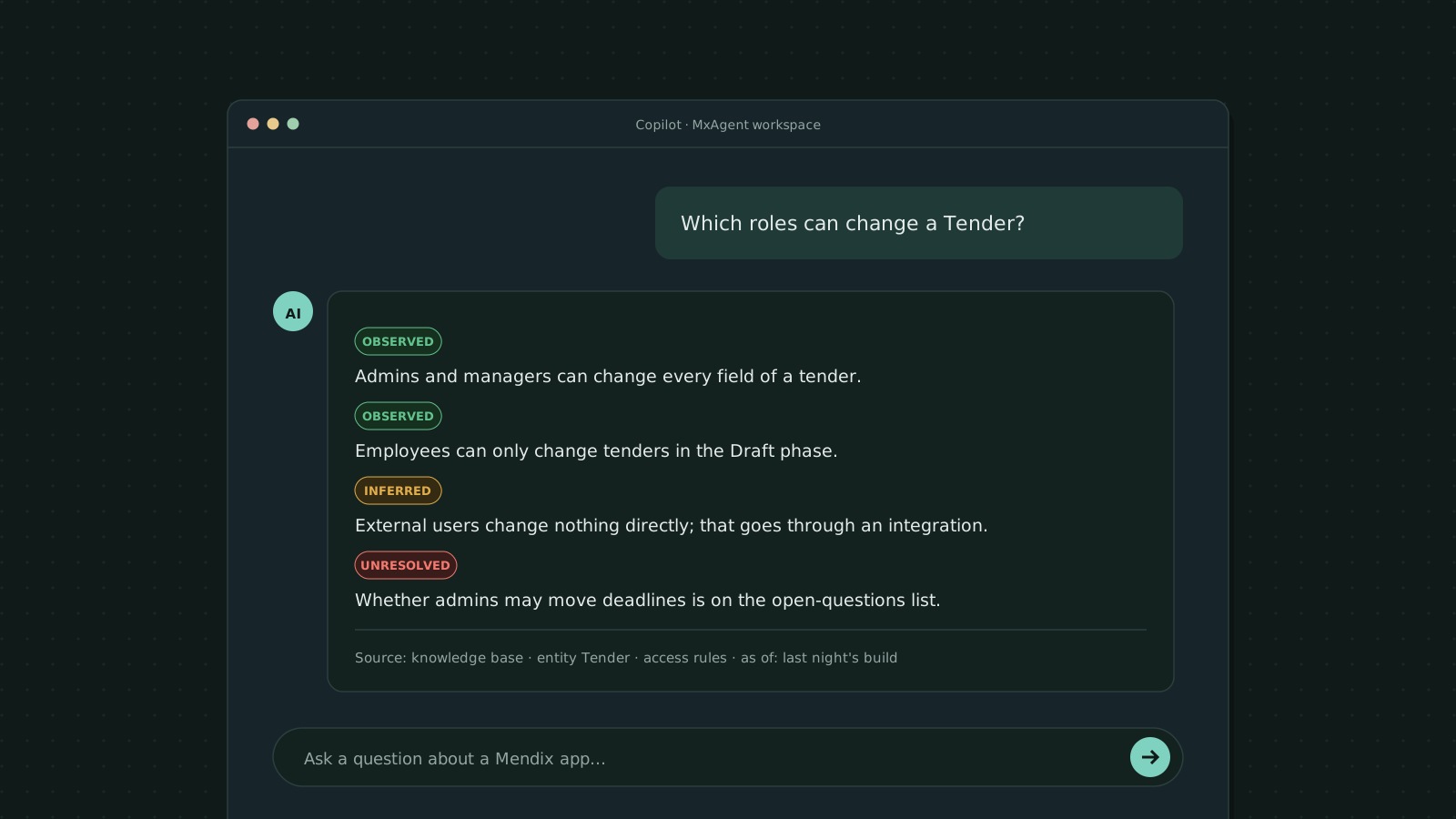
ANWB has nineteen Mendix applications. If you want to know how one of them works, say which role can change a record or which systems it talks to, you either open the project in Mendix Studio Pro or track down a developer who knows the app. With Mx-tooling, any developer can just ask in GitHub Copilot or Claude Code. Someone types "Which roles are allowed to change a Tender?" and gets an answer back, with the source file and its date. Behind that sits a GitLab group of three projects: MxForge, MxKb and MxAgent. I came up with all three and built them myself, and the design is mine as well.
Since August 2026 I've worked on nothing but AI, and this project is the biggest part of that. It's my first project where AI is everything: the thing I'm building, and the tools I'm building it with.
The challenge
Give an AI assistant no facts and it will invent an answer that sounds plausible. When the question is about access rights, or about what a change will affect, a plausible wrong answer does more harm than no answer at all. There was more to it. The source of a Mendix app isn't plain text that a language model can simply read. And it all had to be safe: no passwords or keys in the knowledge base, and no chance of the apps themselves being changed by accident.
What I built
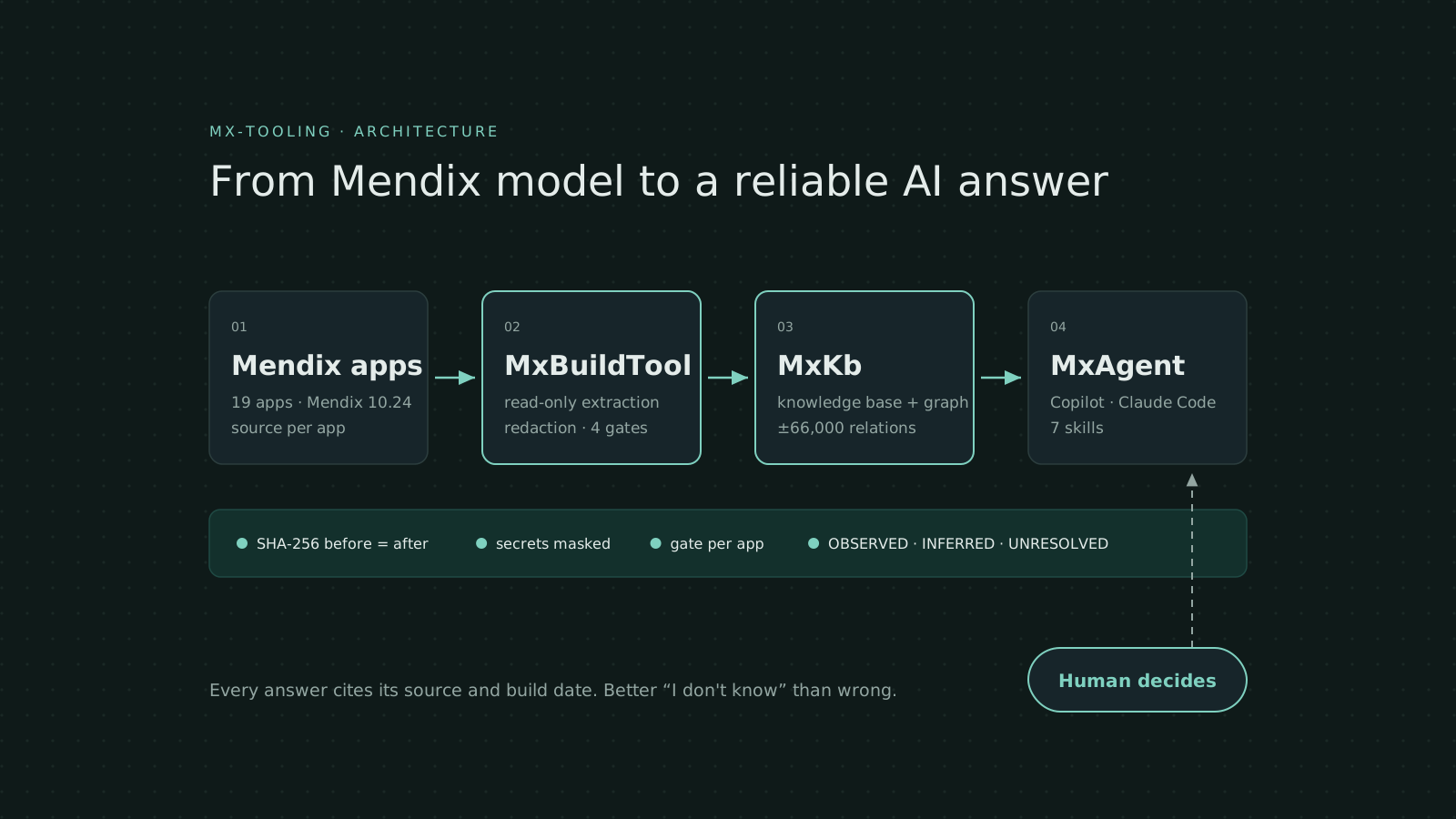
Three projects in one GitLab group, set up as a chain in which each one feeds the next:
- MxForge: the build line. It holds MxBuildTool, a Python package that reads each app read-only from eight sources and turns what it finds into a knowledge base: one file per microflow, page or entity, plus a graph of how it all fits together. It also holds MxBuildBot, the configuration that says which apps get built with which versions, and which fact checks each build has to pass.
- MxKb: the knowledge base itself. It comes with a small search interface you can use without installing anything extra.
- MxAgent: the workspace where Copilot or Claude Code puts the knowledge base to work. This is where the skills for concrete tasks live, like turning a Jira story into a step-by-step plan, drafting a migration plan for the new React client, giving styling advice or estimating what a rebuild would cost.
Key features
An evidence label on every answer.
The assistant always tells you how sure it is. OBSERVED means it's literally in the source, INFERRED means it was derived (with the reasoning shown) and UNRESOLVED means it can't be established. In that case it doesn't guess; the question goes onto a list of open issues instead.
Safe extraction, with proof.
A guard only lets read commands through. The project gets a fingerprint (SHA-256) before and after extraction, and if the two match, nothing has changed. Passwords and keys are spotted and masked before anything is written.
Quality gates.
Each app has to get past a gate that checks dozens of points. After that, four gates run across the whole delivery, covering secrets, completeness, size and leftovers. If an app fails, its previous version simply stays in place.
A graph for impact questions.
On one impact question, Mendix's standard index found 3 affected elements. The graph found 16. So the answer that looked complete covered only 19% of the picture.
Skills that finish the job.
One skill turns a business request into a reasoned proposal with a confidence score and a validated script. Another turns it into a step-by-step plan for Studio Pro that matches the right version.
How it works
First the source of each app is read and cleaned up. Then come the checks, and only what passes them becomes a delivery of the knowledge base. The AI assistant reads from that delivery alone, and with every result it tells you which file it came from and how recent it is. Ask about your own feature branch and the assistant reads that live.
How I build: AI as a team, with me at the helm
Most of this project was built by AI agents. The architecture and the safety rules are my own, and so is every decision made on the way. In Claude Code, one orchestration session directs six parallel sessions, each handling its own part of the work. A change log keeps track of who changes what. Anything with real consequences, such as pushing or deleting, waits for my approval. For each task one agent writes the code and another reviews it, and I pick the model according to the risk.
I'd rather measure than take things on trust. In an A/B test, a fresh agent answered the same eight questions twice: once with the knowledge base and once with the raw Mendix tools. With the knowledge base it was 2.4 times faster and used 26% fewer tokens. Measuring is also how I caught a silent regression after a tool upgrade that would otherwise have gone unnoticed. And it showed that an optimisation which stripped out 21% of the relations didn't change a single answer.
Where it stands
Working today
- The build tool reads apps safely and builds the knowledge base from them, backed by 2,210 tests and 95% coverage.
- Thirteen apps are searchable, and developers are already asking questions about them in Copilot.
- Seven skills handle concrete development work, from step-by-step plans to migration plans.
Next stepawaiting approval
- A dedicated MCP server, so the AI can search more precisely.
- A nightly automated build that produces a dated delivery.
- A change flow in which the AI modifies an app on a feature branch, with three fixed moments where a human decides and hooks that block changes to the main line.
Key figures
19
Mendix apps in the landscape
13
apps searchable in the knowledge base
±66,000
relations in the knowledge graph
2,210
automated tests, 95% coverage
7
AI skills for concrete development tasks
−26%
tokens per question compared with the raw tools
2.4×
faster answers
Tools used
- AI development
- Claude Code (orchestration sessions, subagents, skills)GitHub Copilot
- Build tool
- PythonTyperSQLitepytestruffmypy
- Mendix
- mxcliMDLMendix 10.24
- DevOps
- GitGitHub ActionsGitLab CI in preparation
What I learned
- 01
Agentic engineering:: splitting work across parallel AI sessions without losing control, and choosing the right model for each task.
- 02
Designing guardrails:: speed can't come at the cost of safety. I handle that with read guards, fingerprints, gates and points where a human makes the call.
- 03
Evals and measurement:: testing AI output against fixed questions and hard numbers, not gut feeling.
- 04
Making knowledge accessible to AI:: building a knowledge graph and a router that stay within a language model's context budget, meaning the amount of text it can take in at once.
- 05
Production-grade Python:: a proper package with a CLI, pinned versions and 95% test coverage.
Want to bring AI into your development team and still stay in control? I'm happy to talk it through.